
AyniCam
iPhone dashcam app with local incident recording
AyniCam is an iPhone dashcam app for local incident clips and on-device AI. Compare Free and Pro recording limits. Requires iOS 17 or later.
Can I use my iPhone as a dash cam?
Yes. AyniCam turns a compatible iPhone into a dashcam app that saves recent incident footage and detects supported road objects on the device. It is free to download on iOS 17 or later, with an optional AYNI Pro subscription. You need a secure mount, available storage and the app’s camera session running. Choose it for selected incident clips; it does not promise continuous, screen-locked or unattended overnight recording. Before choosing your setup, check iPhone compatibility, follow the step-by-step setup guide and review how incident recording works.
A closer look at AyniCam
Explore the Maps view and incident workflow
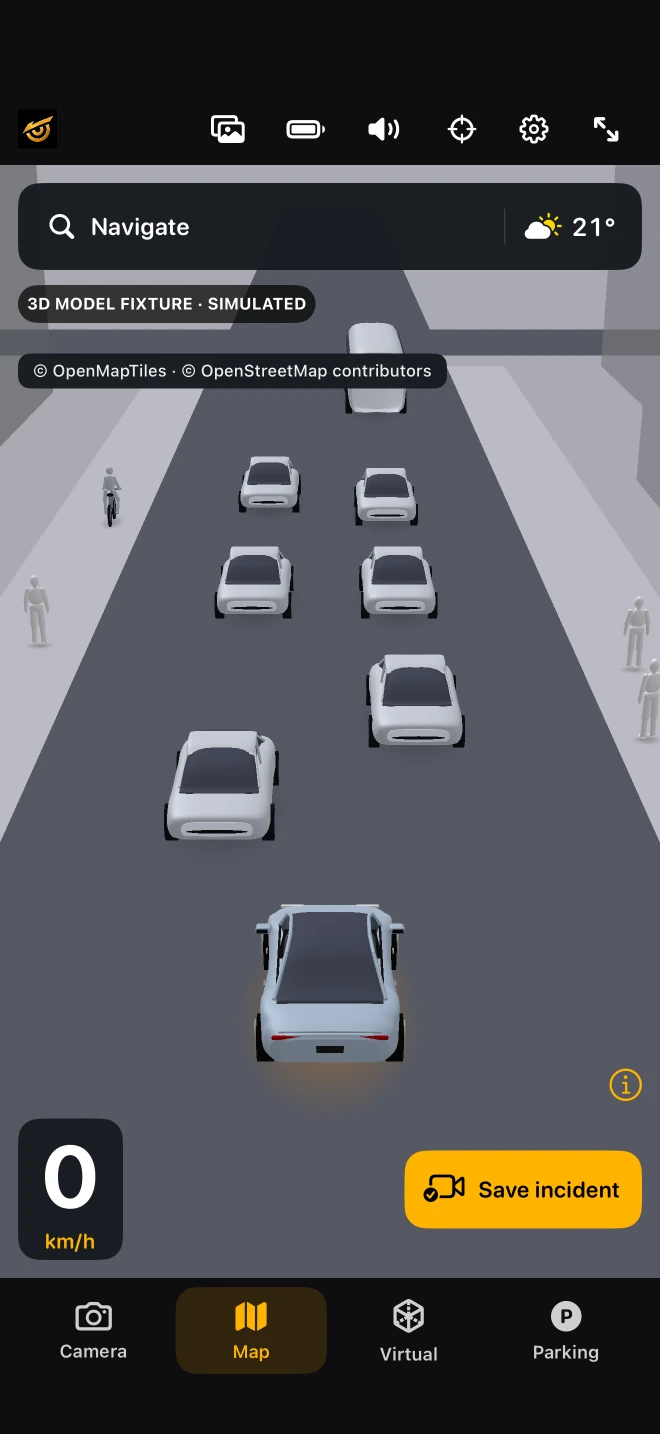
The Maps interface places a simplified object scene within a map view. Explore this existing simulator capture, then follow the three steps below to understand how recent incident footage is saved. The image shows a simulated scene; actual saved video must be checked separately.
- An active camera session builds a recent video buffer.
- Saving retains the available incident buffer: up to 20 seconds in Free or 30 seconds in Pro.
- Open the saved clip, play it and check an exported copy before relying on it.
This is a workflow explanation, not a captured recording. A new or interrupted session may have less history. Free uses driving context; Pro requires an active camera. Neither is a continuous full-trip archive.
Explore the interactive 3D map demo · Read how we verify claims
What to look for in an iPhone dashcam app
Start with the recording you need, then compare the app’s documented behavior. A phone you already own can be useful, but installation, a live camera image and a successful saved export are three different checks.
- Recording: does it keep a full journey or selected incident clips? What happens after an interruption?
- Practical setup: can you mount it securely, power it appropriately and keep storage available?
- Evidence: can you review and export the actual video you need, with the expected duration and audio?
What gets recorded?
While recording is active, AyniCam maintains a rolling buffer. Save incident preserves the available footage leading up to the tap: Free supports up to 20 seconds at 720p in driving context; Pro supports up to 30 seconds at 1080p and allows saving while stationary. A newly started or interrupted buffer can contain less. This is not a promise of continuous full-trip recording or unattended coverage while the phone is locked.
Free or Pro: which iPhone dashcam setup fits?
These are maximum incident-buffer lengths, not continuous journey recordings. Starting a session or resuming after an interruption can leave less footage available. Check a saved test clip while safely parked before relying on your setup.
| What you need | Free | AYNI Pro |
|---|---|---|
| Recent incident footage | Up to 20 seconds | Up to 30 seconds |
| Saved video resolution | 720p | 1080p |
| Microphone audio | Silent clips | With microphone permission |
| Saving while stationary | Driving context required | Supported while the camera session is active |
Will this replace a dedicated dashcam?
It depends on the job. An iPhone app can suit a driver who wants to use an existing phone for selected clips and on-device detection. If you need a permanent installation, simultaneous front and rear recording or unattended parking surveillance, compare dedicated hardware with those documented capabilities. AyniCam’s Parking view uses the active forward-facing camera; it is not an overnight parking recorder.
What the AI adds
Camera view places supported object labels over the image. Virtual View simplifies those detections; Parking uses the same forward-facing camera. Optional Pro segmentation adds masks. Maps draws roads and buildings from map data and places estimated detections in that context. None of these views controls the car, supplies 360-degree coverage or guarantees that every hazard is detected.
Prepare before a drive
Check compatibility and free device space, position the phone without obstructing your view, and allow the permissions needed for your selected features. Choose the model and view while parked. Review a saved clip once safely stopped. Set realistic expectations for battery, heat, interruptions and camera visibility; we have not published a physical-device endurance benchmark here.
Privacy and the next step
Road detection runs on the iPhone and incident clips remain local unless you export or share them. Maps, search, directions and weather use online providers. Read the privacy policy and compare Free and Pro before installing. The setup guide explains the task; the recording feature documents the limits.