Free & Pro
Parking View
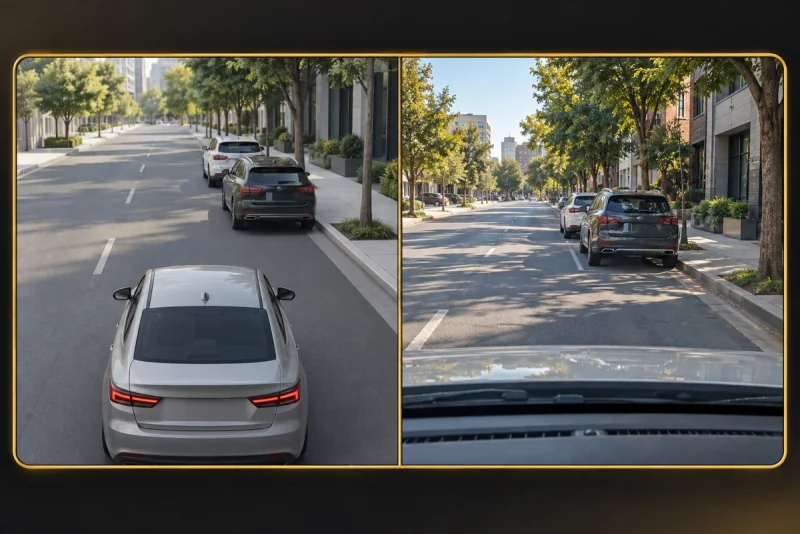
Two views. One nearby scene.
See a simplified scene beside the camera view, with proximity beeps for supported nearby detections.
Camera and scene together
Parking divides the display between the camera with detection boxes and the simplified scene. The panels stack in portrait and sit side by side in landscape. Both read the same camera observations.
Designed for low-speed use
Select a detector model, then Parking using the view control. Prepare the phone position and audio while stopped. Beeps respond to estimated proximity of supported detections; their absence is not an all-clear signal.
One camera, not surround sensors
Parking has no 360-degree coverage, rear-camera feed from your vehicle or parking-line detector. A forward-facing phone cannot see behind the car. Distances are approximate: continue using direct observation, mirrors and the vehicle’s own equipment.
Prepare and verify the camera direction
Check the mount and lens while stopped, then choose Parking with a detector model. Identify the area outside the frame before manoeuvring. The view is not a parking-space search, parking-payment service or automatic parking system. Never use a drawn gap as a clearance measurement.
When to switch views
Use Detection if you need a larger camera image to interpret a box. Both Parking panels use the same observations, so agreement between them is not independent confirmation. Keep direct observation, mirrors and vehicle equipment as the basis for a manoeuvre.
Read the guide ↗