
AyniCam
AI dashcam app for iPhone, with on-device detection
Explore AyniCam’s AI dashcam for iPhone: on-device road-object detection and local incident clips. Compare Free, Pro and documented feature limits.
An AI dashcam app for the iPhone you already own
AyniCam brings road-object detection and incident recording together on a compatible iPhone. The camera AI runs on the phone, without sending camera footage to AyniCam’s servers. Free includes detection and local incident clips; Pro adds capabilities including segmentation and longer, higher-resolution clips. Downloading is free, and Pro is optional. Maps, search, routes and weather still use online services. Explore on-device road-object detection, the separate segmentation view and the available AI models to choose the output you need.
A closer look at AyniCam
Explore the Maps view and incident workflow
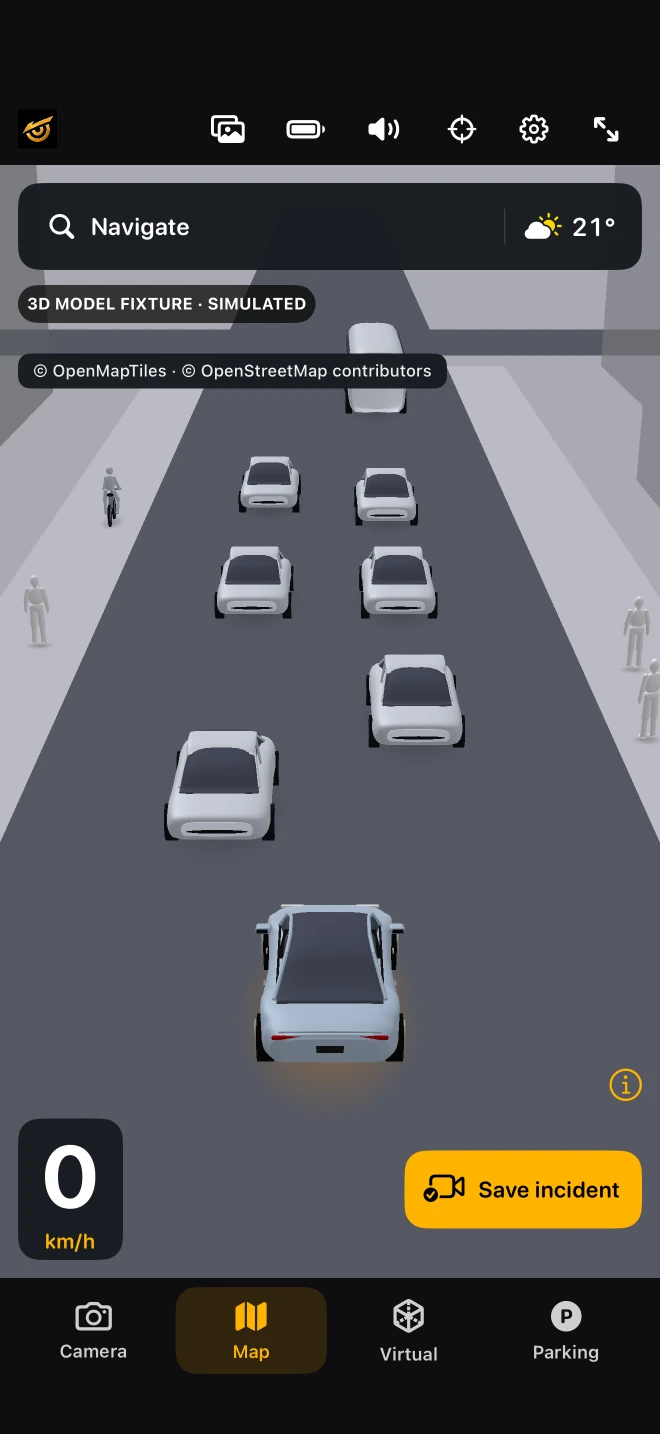
The Maps interface places a simplified object scene within a map view. Explore this existing simulator capture, then follow the three steps below to understand how recent incident footage is saved. The image shows a simulated scene; actual saved video must be checked separately.
- An active camera session builds a recent video buffer.
- Saving retains the available incident buffer: up to 20 seconds in Free or 30 seconds in Pro.
- Open the saved clip, play it and check an exported copy before relying on it.
This is a workflow explanation, not a captured recording. A new or interrupted session may have less history. Free uses driving context; Pro requires an active camera. Neither is a continuous full-trip archive.
Explore the interactive 3D map demo · Read how we verify claims
What makes a dashcam an AI dashcam?
An ordinary recording preserves an image sequence. An AI driving app also interprets camera frames to identify supported objects or surfaces. AyniCam combines on-device road-object detection with a local incident buffer on iPhone. The labels help explain what the model recognizes; they are not a guarantee that the road is clear or that an incident will be prevented.
Camera labels, simplified views and masks
Detection places boxes and class labels on the original image for supported vehicles, people, bicycles, motorcycles, traffic lights and stop signs. Virtual View simplifies those observations. Parking presents a nearby scene beside the same camera view. The optional Pro segmentation model highlights object shapes and road surface in a separate view. A road mask is not a certified lane boundary or permission to drive through an area.
Maps is a different source of information
Version 2.0.1 includes 3D Maps in Free and Pro. Roads and buildings come from mapping data; camera detections appear at estimated positions. This is different from reconstructing all road geometry from the camera. Search, routing and weather depend on online providers and coverage. The same detected object appearing in more than one view is not independent confirmation.
Local processing and privacy
Camera AI runs on the iPhone, and AyniCam does not upload camera feeds or incident videos to its servers. Clips can be shared by the user. Map and weather requests still communicate with providers; weather requests include coordinates and providers may retain technical logs. No account and offline operation are not, on their own, proof of zero data transmission. Read the scoped privacy policy.
Understand the limits before choosing
Small, dark, hidden or unfamiliar objects can be missed; glare or reflections can cause incorrect labels. Confidence is model output, not collision probability. AyniCam does not steer, brake, dispatch emergency services automatically or replace vehicle sensors. We do not publish an independently measured detection-accuracy percentage or universal hardware-speed claim here.
Choose by the task
For preserving recent footage, compare the recording limits. For reading detections, start with Camera and the model guide. For shapes rather than boxes, inspect the Pro segmentation description. Choose Free or Pro for a documented capability, not an unmeasured claim that a paid model is always faster or safer.